Intimate is live, and free while we're small. Log in or sign up →

A private daily check-in app for couples

Tell each other how you are and what you’d love today.

Intimate is a private app for two people. Each of you checks in with your mood and what you’d love today, asks for things in up to three words, and ticks what helped you feel close. Most of it takes a few taps.

Live now and free for now. Works from your phone’s Home Screen.

Got a code? Join your person

What brings you close

Your threads

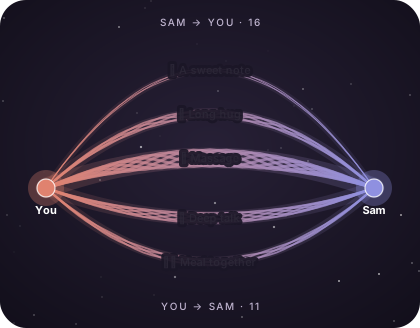
💆 Massage🫂 Long hug💌 A sweet note💬 Deep talk🍽️ Meal togetherYouRobin

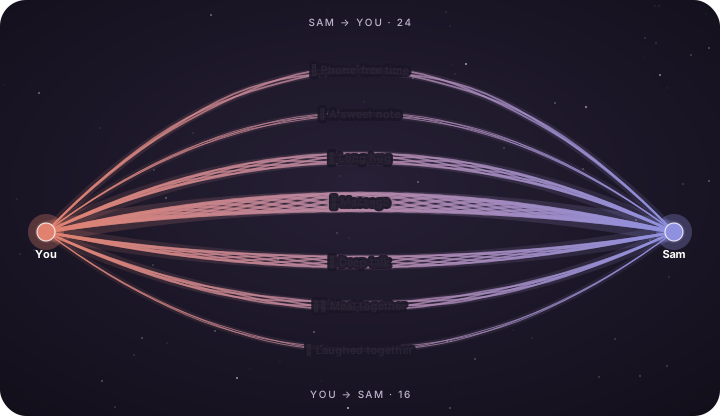
Each tick is one strand.

ThreadsA dark sky, two glowing people and braided threads between them, each one named.

Daily check-inToday I’d loveNeedsHeartsThreadsWeekly recapForecastShared calendarCycleShare cardsQuiet notificationsPrivate Log

It can be hard to know how your partner is feeling.

At the end of a busy day, many couples ask each other “tired?”, hear “a bit”, and leave it there. It’s hard to tell whether your partner has the energy to be close, and asking directly can feel awkward.

Intimate gives each of you a short daily check-in that the other person can see, and a simple way to ask for something.

See how it works →

  • Two people per spaceEach space holds exactly two people.
  • Discreet notificationsA notification doesn’t say what a need is unless you turn on details.
  • Runs from your Home ScreenIt’s a web app. You add it to your Home Screen from the browser in a few taps.
  • Free for nowThere is no charge during early access.

How it works

Three things you do in the app.

  1. Check in.

    Choose your mood, how much you have to give, and what you’d love today. Your person sees it as soon as you save.

  2. Ask for something.

    Send one need at a time, in up to three words. They answer with a tap: Yes, Later or Not today.

  3. Look back at your week.

    You rate each met need in hearts and tick what helped you feel close. Reports count the days you were in sync.

How it works, step by step →

Find your starting point

What’s going on for you?

Pick the option that fits you best and we’ll suggest where to start.

Choose one above. You can change your mind.

Start here

Home shows how each of you is today, before either of you asks.

When your days don’t line up you get a one-line heads-up, and the days you do line up get counted.

Three features that fit

  1. Your person’s card.

    Their mood, what they’d love today and their capacity are on Home as soon as they check in.

    See the demo →
  2. One-line heads-ups.

    A single line appears when something’s worth knowing, such as your energy being high and theirs low.

    See the demo →
  3. In sync.

    When your check-ins closely match, Home shows an In sync card and the day is counted.

    See the demo →
😌😤🥰

Robin is feeling calm

Updated just now

It changes the moment they save.

Start here

You ask in up to three words and your person answers with a tap.

Not today is one of the three answers, and your person can add a note to it.

Three features that fit

  1. “Today I’d love…”

    Pick what you’d love today and it appears at the top of your card.

    See the demo →
  2. Ask in up to three words.

    When you want to ask for something specific, it takes a few words, a day and a time.

    See the demo →
  3. Yes, Later or Not today.

    Yes, Later or Not today, with a note of up to 140 characters if they want to add one.

    See the demo →

Your check-in

Today I’d love…

At the top of Robin’s view of you

Tap a chip.

Start here

You each check in when it suits you and the other sees it straight away.

Each of you has your own timezone, so your day resets at your own midnight.

Three features that fit

  1. Your person’s card.

    Their card updates live, with how long ago they last checked in.

    See the demo →
  2. Something to share.

    One short note a day, up to thirty words, for a win or a thought you’d normally save for later.

    See the demo →
  3. One shared calendar.

    One shared list of what’s coming up, in each person’s colour, so the week is visible to both of you.

    See the demo →
😌😤🥰

Robin is feeling calm

Updated just now

It changes the moment they save.

Start here

Reports build as you both check in: a recap each Monday, what tends to go with your better days, and a forecast labelled as a guide.

The larger reports open after 3, 7 and 14 days of check-ins.

Three features that fit

  1. Monday’s recap.

    Last week at a glance: days in sync, needs met, your best day and your hardest.

    See the demo →
  2. What each connection does.

    Days with a connection next to days without, over ninety days. It labels them patterns and needs at least three days of each.

    See the demo →
  3. The next three days.

    What a usual Tuesday looks like for each of you, as a guide only. It opens after fourteen days of check-ins.

    See the demo →

Mon 6 – Sun 12 October

Your week

3✨ Days in sync
2 of 3🔥 Needs met · 💖 1 loved
Wed🌿 Best day
Sun🌧️ Hardest day
·M✨T✨W·T✨F·S·S

Home tells you on Monday that it’s ready.

Start here

Make a story or square card from your month, using your threads, in-sync days or highlights.

It’s drawn on your device, and you choose every number that goes on it.

Three features that fit

  1. Six cards.

    Six cards: Our stats, Felt connected, Our threads, In sync, Mood and Highlights.

    See the demo →
  2. Each tick adds a strand.

    Each time you tick a connection, it adds a strand. After a month the threads form a map.

    See the demo →
  3. You choose every number.

    Switch any stat, your names or the dates off. Connection names on the Threads card start hidden.

    See the demo →

Dusk · Story

Tap the card to flip it.

Start here

Start a space, send the code, and each pick what you’d love today.

That’s all you need to do on the first day. The other features are optional.

Three features that fit

  1. Start a space for two.

    A six-character code. Your person types it in and you’re both in.

    See the demo →
  2. Fifteen moods to choose from.

    One tap for how you feel, and your person sees it the moment you save.

    See the demo →
  3. “Today I’d love…”

    Twelve gentle options for what would feel good today.

    See the demo →

Start a space

Your code

K7M2QX

Share this with your person.

Robin joined. A space holds exactly two.

See every feature →

Daily check-in

See how your person is today.

Some days you have a lot to give and some days you have very little. The check-in lets you tell your person which in a few taps.

  • Four scales. Mood, energy (how your body feels), capacity (what you have to give) and in the mood (whether you’re open to intimacy).
  • ”Today I’d love…” Twelve gentle options, from Touch and Quality time to Stillness and A good listen.
  • One-line heads-ups. For example, “Your energy is high, and Sam’s capacity is low today.” The app doesn’t add advice.
  • Daily reset. Your check-in resets at midnight in your timezone.

Daily check-in →

Needs

Ask for what you’d love in a few words.

Write up to three words, pick a day and a time, and add a line if you want to. Your person answers with one tap, and afterwards you rate how much it meant.

  • One at a time. You can ask again once the last need has been answered and rated.
  • Yes, Later or Not today. Your person can add a note to any answer.
  • Hearts. You rate a met need from “A little” to “Meant the world”.
  • Discreet notifications. The lock screen shows “Sam shared a need 💫” unless you turn on details.

How needs work →

Felt connected

Keep track of what helps you feel close.

Each day you can tick the things that helped you feel close, such as a long hug, a walk or an evening without phones. After a few weeks, Intimate shows which of them go with your better days, how often you were in sync, and a forecast for the days ahead.

  • Your own list of up to ten things, in your own words.
  • Weekly recap. A summary of last week for both of you, ready on Monday.
  • Forecast. An estimate of the next few days, labelled as a guide only.
  • Patterns. Reports describe what tends to happen together and don’t draw conclusions.

Reports and forecast →

Everything inside

Eleven screens from the app, in the order of a day.

Check in, ask, answer, look back, plan and share. Scroll, or tap a dot to jump to a screen.

01 · Check in

Energy, capacity, in the mood.

Five steps each, and every step has a label. Capacity is what you’ve got to give today.

02 · In sync

In sync.

When you’ve picked at least two of the same wants and your levels sit within a step, Home lights up.

03 · Ask

Ask in up to three words.

For example “Slow massage” or “Long kissing”. A need can be up to three words.

04 · Answer

Yes, Later or Not today.

Your person picks one of the three answers and can add up to 140 characters.

05 · Felt connected

Tick what brought you close.

Today or yesterday. A long hug, a walk, an evening without phones.

06 · Threads

Each tick adds a strand.

A dark sky, two glowing people and braided threads between them, each one named.

07 · Weekly recap

Monday’s recap.

Days in sync, needs met, your best day and hardest, and a few things you shared.

08 · Forecast

Chance of being in sync.

Fourteen days ahead, worked out from how often you’ve really been in sync.

09 · Cycle

An opt-in cycle.

Today’s phase and a fourteen-day strip on the calendar. Your person gets heads-ups.

10 · Share cards

Six cards.

Our stats, Felt connected, Our threads, In sync, Mood and Highlights.

11 · Notifications

Quiet notifications.

Off until you switch them on. The lock screen reads “Sam shared a need 💫” unless you ask for details.

Today

How are you feeling?

Today I’d love…

Saved ✓ Robin can see this.

See every feature with demos →

What couples say.

These are sample quotes, written to show the layout of this section. They will be replaced with real quotes from couples who use Intimate.

Sampleten years in

After ten years we mostly just asked each other if we were fine. My morning check-in takes about ten seconds, and Tom reads it with his coffee. I like seeing his mood on my screen too.

Priya & TomTogether 10 years
Samplelong distance

Ben works two weeks on and one week off up north, and I’m in Auckland most of the month. I look at his card on my lunch break to see whether he has the energy for a phone call.

Aroha & BenTogether 4 years, long distance
Samplenew parents

We use the sleep slider more than anything else. When Fatima logs four hours of sleep, I take the first feed, and we don’t need to discuss it at 3am.

Fatima & LukeNew parents, baby is 8 months
Sampleshy about asking

I find it hard to ask for things. Writing three words and picking a time is much easier for me. Marcus said yes to ‘Slow massage’ and added a short note, which I read several times.

Chloe & MarcusTogether 2 years
Samplemismatched schedules

Nina works rotating shifts and I work nine to five, so we don’t see much of each other during the week. We use ‘Today I’d love’ to tell each other what we’d like when we’re apart, and we both use it most days.

Nina & CallumTogether 6 years
Samplesaying no kindly

Sophie answered ‘Not today’ with a note: ‘rubbish week, ask me Friday’. I asked again on Friday. The note made the answer easier to hear.

Sophie & RajTogether 5 years
Samplecycle heads-up

Hana turned on cycle tracking, so I get a heads-up the day before her period. I mostly use it to plan dinner on those days.

Hana & JoelTogether 3 years
Samplethreads

We each tick our own list at night and look at it on Sunday. I mostly tick ‘Walk together’ and ‘Phone-free time’, and Omar mostly ticks ‘Helped out’ and ‘Meal together’. It was interesting to see how different our lists are.

Grace & OmarTogether 7 years

Felt connected

Each tick adds a strand to a thread.

Every time you tick a connection, its thread gets one more strand. Threads get thicker the more often something happens, and brighter when you’ve given that connection more hearts. After a month the map shows all your connections side by side.

Two glowing points, Sam and Robin, joined by braided threads that arc above and below, each labelled: Massage, Long hug, Deep talk and more. Two glowing points joined by braided threads that arc above and below, each labelled with a small emoji and a name.

Your threads, one month. You give each connection one to three hearts. Your person can’t see the number, but they can see that the thread is bolder.

See how threads work →

Privacy

Only the two of you can see your space.

Intimate holds personal information, so what you share goes to your person and nobody else.

  • Exactly two people. A space holds you and your person.
  • A private Log. Notes about your person that only you can read.
  • Discreet notifications. The lock screen shows “Sam shared a need 💫”. The need itself appears only in the app. Quiet hours are on by default.
  • Share cards made on your device. Nothing is uploaded when you make one.
  • No ad trackers in the app.

Your data is not end-to-end encrypted. The privacy page lists what we can and can’t promise.

Today’s mood & wishes You both
A need you ask for You both
Your Log Only you
The number on a connection Only you

What Intimate does.

A shared daily record.

You each record how you are and what you’d love, and your person can read it. There’s no messaging feature, because most couples already use a messaging app.

Heads-ups and a weekly recap.

You get a one-line heads-up when your days don’t match, and a recap every Monday. Neither one gives advice.

Reports on your patterns.

Reports show what tends to go with your better days, and say so when there isn’t enough data yet.

Quick to use.

Most days it takes under a minute. It gives no medical or therapy advice and doesn’t score your relationship.

FAQ

Quick questions.

Do we both need to sign up?

Yes. Each of you has your own free account. One of you starts the space and shares a six-character code, and the other joins with it.

Who can see what I share?

Only your person. Your Log is for you alone.

Is it going to be awkward?

Most of it is tapping, and a need is up to three words that you type. Needs can be tender, playful or sexual, and you write them in your own words.

How do I get it?

It’s live now as a web app. You log in or sign up, then add it to your Home Screen in a few taps and skip the app store.

All the questions →

Start your space.

Log in or sign up, then share your six-character code with your person. You can both check in the same day.

Send this to your person →

Log in or sign up